Get started
The tutorial builds a small wall with one mistake, then fixes it, and shows the report and the image of each build.
Install
A uv project holds the tutorial's build scripts, and uv installs Python if needed. The project pins Python 3.14, the version bricky recommends: on 3.15, installing compiles the solver HiGHS, which needs a C++ compiler.
uv init --bare --pin-python --python 3.14 my-models  # a project for your build scripts
cd my-models
uv add bricky                                        # bricky and every dependency, from PyPI
uv run playwright install chromium                   # the browser bricky renders in, once per machine
uv run bricky --version                              # the installed version
Playwright's Chromium renders the images.
On Linux, uv run playwright install --with-deps chromium also installs the browser's system libraries.
To render with a Chromium already on the machine, set BRICKY_RENDER_BROWSER to its executable instead (see Configuration).
With pip on Python 3.12 to 3.14, run pip install bricky and then playwright install chromium.
To install bricky as a tool, run uv tool install --python 3.14 bricky --with-executables-from playwright, then playwright install chromium.
The command is then bricky, without uv run, wherever the docs write uv run bricky.
A clone of the repository runs every example and the benchmark, and is the way to work on bricky:
git clone https://github.com/maxencefaldor/bricky && cd bricky
uv sync
uv run playwright install chromium
Write a build script
A build script is a Python file whose build() returns a ModelBuilder.
Create a folder models/ and save this wall as models/wall.py:
from bricky import ModelBuilder


def build() -> ModelBuilder:
    builder = ModelBuilder("wall")
    for course in range(3):
        z = 3 * course  # a brick is three plates tall
        if course % 2 == 0:  # two bricks 1 x 4
            builder.place("3010", at=(0, 0, z), rotation="R90", color="Red")
            builder.place("3010", at=(4, 0, z), rotation="R90", color="Red")
        else:  # offset joints: a brick 1 x 4 between two bricks 1 x 2
            builder.place("3004", at=(0, 0, z), rotation="R90", color="Red")
            builder.place("3010", at=(2, 0, z), rotation="R90", color="Red")
            builder.place("3004", at=(6, 0, z), rotation="R90", color="Red")
    builder.place("3004", at=(3, 0, 10), rotation="R90", color="Blue", id="chimney")
    return builder
Each call to place names a part, the corner at where it goes, a rotation and a color.
The corner reads (x, y, z): east and north in studs, up in plates.
Unrotated, a Brick 1 x 4 runs north, along y; the rotation R90 rotates it 90 degrees so it runs east.
The last call gives the blue brick an id, so the report and the images name it.
Build it
The build runs the script in a process of its own, then saves, checks and renders the model. The report opens with the model's size and then states what is wrong. The report's last line, the time each step took, is left out of the outputs below:
saved models/wall.bricky.json: 8 elements, 8 x 1 studs, 13 plates tall

error[floating-group]: 1 element floats: no chain of stud connections leads to the ground
  --> x 3..5  y 0..1  z 10..13
   = chimney: Brick 1 x 2 (3004), Blue, models/wall.py:15 in build()

by source line:
  models/wall.py:15 in build(): 1 diagnostic

checked 8 elements against 8 rules (overloaded-studs, strained-studs ignored): 1 error, 0 warnings

rendered (open the images to see the model):
  sheet: models/wall.png
The diagnostic states one fact: the blue brick floats.
The top course ends at z = 9 and the brick starts at z = 10, one plate higher, so no stud holds it.
The region after --> says where, in studs and plates.
The line after = names the element, its part, its color and the script line that placed it.
The sheet shows the same fact: it tints the floating brick red and labels it with its rule, floating-group.
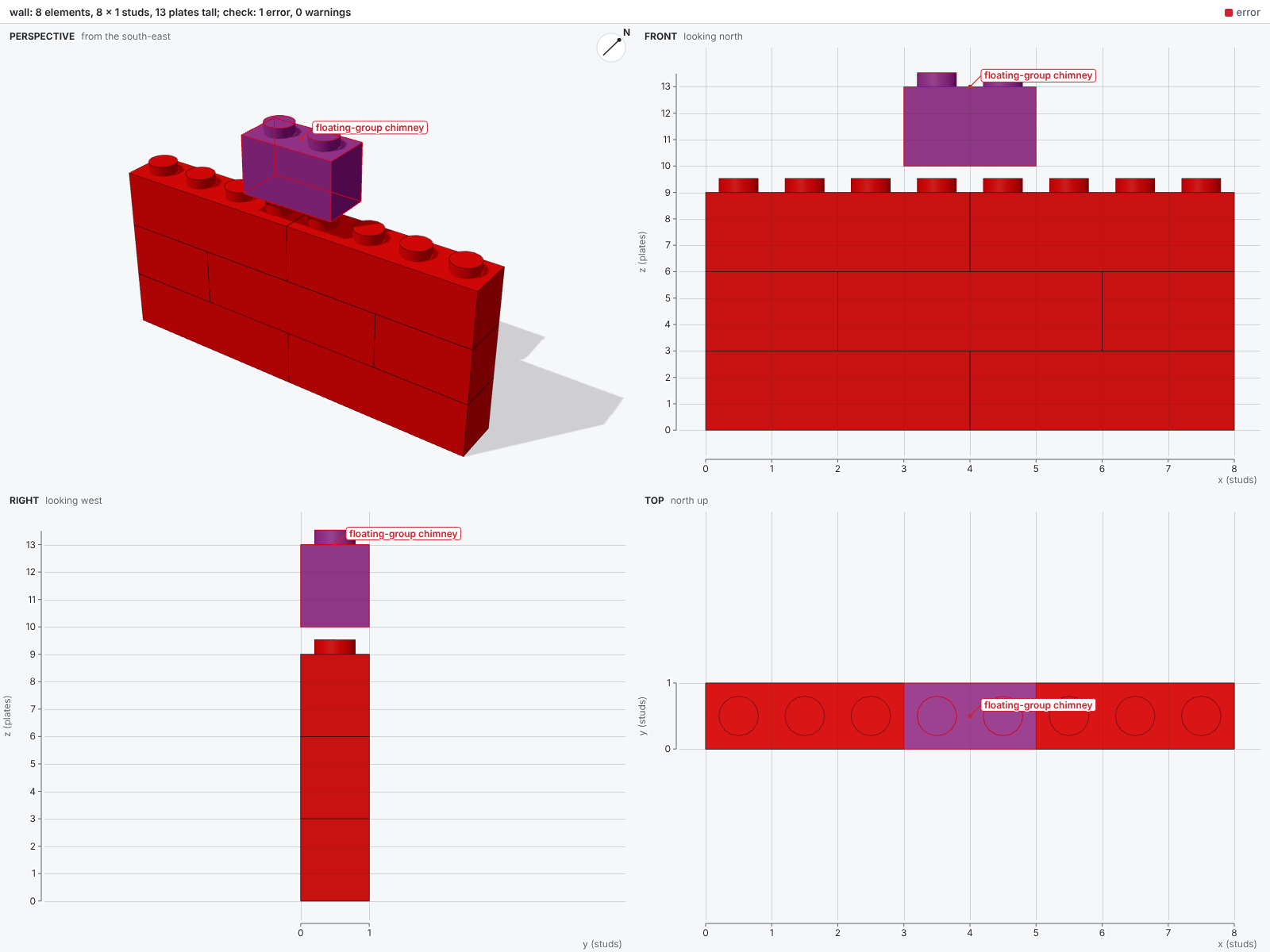
The front and right views carry rulers in the units of at, so the one-plate gap reads straight off the z ruler.
Fix it
Lower the chimney onto the top course, at z = 9:
Build again. The report now opens with what changed since the last build:
saved models/wall.bricky.json: 8 elements, 8 x 1 studs, 12 plates tall

since the last build: 0 added, 0 removed, 1 changed, 7 unchanged
  voxels: 2 filled, 2 emptied, 0 recolored
  changed at:
    models/wall.py:15 in build(): 1 element

checked 8 elements against 8 rules (overloaded-studs, strained-studs ignored): 0 errors, 0 warnings

rendered (open the images to see the model):
  sheet: models/wall.png
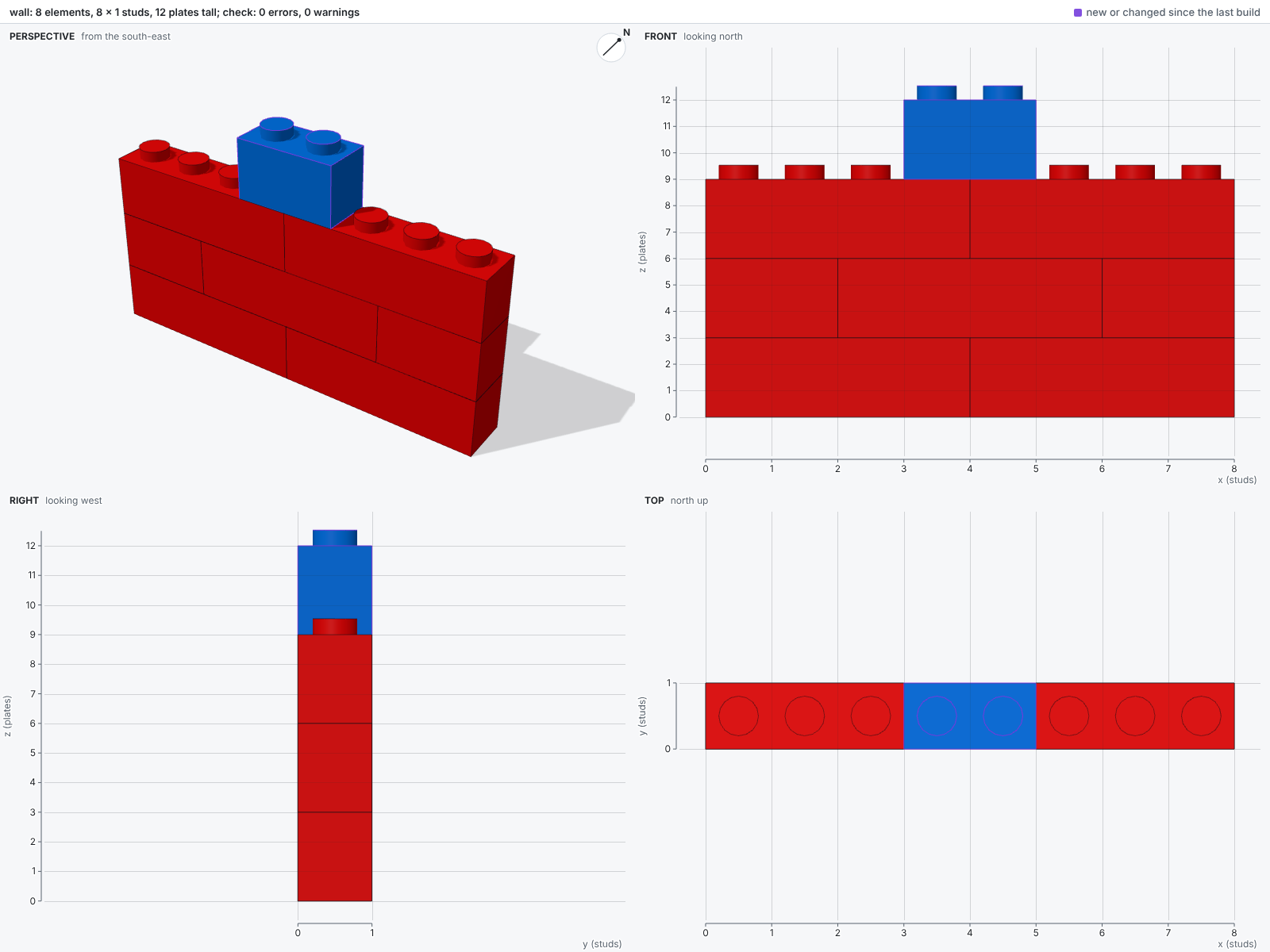
One element changed, placed by line 15, and nothing else moved. The model has no errors, and the sheet outlines the changed brick in purple:
Next steps
Four sections of the docs go further than the tutorial:
-
📘 Guide
Each step of the tutorial in depth, one concept per page, starting with coordinates.
-
🤖 Agents
Hand the loop to an agent through the command line, the MCP server or the skill.
-
🖼️ Gallery
Larger models in a 3D viewer, from a steam train to the Colosseum, each with its script.
-
Every command, rule and setting, including the ones the tutorial used.